Posts

How to Add Controller in MVC

Image
There are two approaches to add the controller in the ASP.NET MVC. Approach-1: Using Scaffolding method. Right Click on Controller Folder Select Add -> Controller  Following picture shows the controller template selected. Click Add button Name the controller as given image Click on the Add button and that all the controller will generate in the Controller Folder as given bellowed Image Approach - 2: By adding a normal class Right Click on Controller folder  Select Add Class or New Item Import the namespace using System.Web.Mvc; Inherit the class name Controller in it. And thats all the controller is ready.

Creating the new MVC project in visual studio and using View Data

Image
Creating the new MVC project in Visual Studio 2015 Open Visual Studio Goto File -> New -> Project Select Templates-> Visual C#-> Web -> Asp.NET Web Application Give project Name(Any Name you Want, I Used "MvcWebApp") Adding a Controller into the project Goto Solution Explorer -> Right Click On Controller Folder Add-> Controller -> Select MVC5 Controller-Empty(In Add Scaffold Box) Give the name for controller HomeController (Suffix xxController mandatory.)  It will generate following code with one Action Method. Now right click on Action Method And select Add View It will Add Index.cshtml int directory Views/Home/ in Solution Explorer. Now Add some code to Action Method Code for Index.cshtml  

Activating IIS (Internet Information Service) in your Windows PC

Image
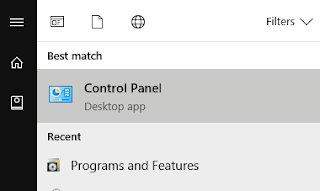
IIS- Internet Information Services It is noting but the "Web Server" Provided by Microsoft in Windows operating system.             Adding/ Activating IIS in your operating System. Goto the Control Panel into your System./ Search " Control Panel " in Start Menu Select Programs and Features in Control Panel. Click Turn windows features on or off. It will open following Selection box. 5. Check all the check boxes and click OK. Tada that's all you have successfully installed IIS onto your system. 6. To check it out it's working or not  type http://localhost into your browser.

How to switch between multiple Main() method in visual studio.

Image
Many times a C# developer doesn't know how to handle the multiple Main() methods in the Visual Studio. Here are the steps to do it.  Goto Solution Explorer right click on Project, It will show following box.   Now click the highlighted dropdown, it will show the class names having Main() method.                                   Select one startup point and save it. That's all done

Loan EMI Calculator using C#.NET

EmiCalculator.aspx (Design Code): <%@ Page Language="C#" AutoEventWireup="true" Culture="en-IN" CodeBehind="EMICalculator.aspx.cs" Inherits="AspDemo.EMICalculator" %> <!DOCTYPE html> <html xmlns="http://www.w3.org/1999/xhtml"> <head runat="server">     <title></title> </head> <body>     <form id="form1" runat="server">     <div>              <table class="auto-style1">             <tr>                 <td class="auto-style2" colspan="2"><strong>Loan EMI Calculator</strong></td>             </tr>             <tr>                 <td class="auto-style6">Amount</td>                 <td class="auto-s...

Getting Started With Very First C# Program.

Creating a new Console Application in Visual Studio. Open a Visual Studio in your system.(You can find it in the Start Menu Programs.) You can create a new project in different ways Using classic method, Goto File -> New -> New Project. Using Quick Method, On Start Page Click on Create a New Project . After Clicking the Create New Project, You will get a template window. Select the Visual C# in side menu. Select the Create new Console Application . Name the Project (any name you want e.g. helloApp). Select the Directory where you want to save it. And Click Create button. Writing Your First Code in C#. After Creating a new project you will get the code like bellowed.   using System;  namespace helloApp        {             class Program              {                   static void Main(string[] args)             ...

Getting toolkit for developing C# applications.

Getting Visual Studio Community Edition At very first you need to know what is Visual Studio?? Visual Studio is an IDE (Integrated Development Environment), which is used to write the code in specific programming languages, compile it, and debug it. Visual studio supports below programming languages. Visual C# Visual Basic Visual C++ Visual F# Visual J# etc..... Where to get Visual Studio You can get Visual Studio Community version from Here . You Can download Visual Studio Community edition for free from above given link. Currently Visual Studio 2017 is the latest version of the Visual Studio. I will recommend to download the latest version from the site.  Getting Microsoft SQL Server Express Microsoft SQL Server is an database server. It is available for free from Here . There two editions of SQL Server available for free (Developer Edition and Express Edition), I will prefer Express edition which is enough for .NET application development. Once these tools are downloaded you can...